What we found
AI removes the most work where one action fits every machine.


Findings from Anunta’s 2026 survey of IT leaders and practitioners
Every IT leader knows the brief by now: the board wants efficiency gains, the business wants an AI story, and the vendors are promising desktops that “fix” themselves. Whether today’s wave of AI investment turns out to be a bubble or not, the pressure it creates inside the organization is real. AI has become a mandate. In our experience, desktop operations is one of the first places expected to show results.
As AI in the IT market evolves and the conversations mature, we wanted to understand where the industry sits between the pie-in-the-sky promise and the day-to-day reality. IT leaders need a narrower question than promise versus reality: Where does AI pay off in desktop operations? Where is it already removing work, and where is it moving or creating work? When should teams take work back, and where should IT leaders put their limited time, budget, and attention next?
The best way to understand what is happening is to ask the people doing the work. So, we surveyed 254 IT professionals: 90 IT leaders and 164 managers and individual contributors. For each task, we asked whether AI removed the work, moved it to another team, traded it for new work, or left it unchanged.
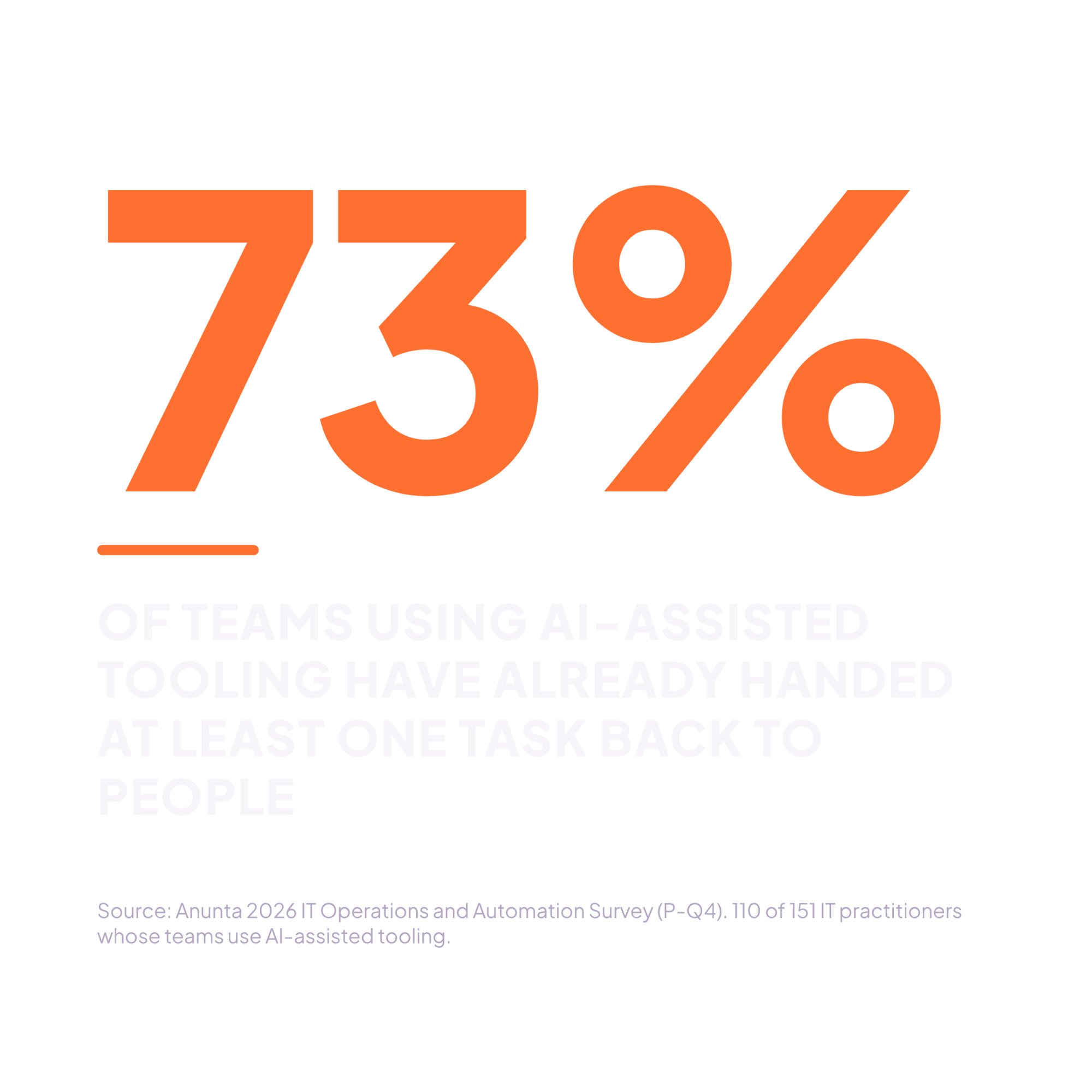
73% of teams using AI-assisted tooling have already handed at least one task back to people.
Teams adopted AI quickly, and they are still learning where it belongs. Their answers point to one pattern. AI pays off where the right action is the same every time, and it costs teams time where the right action depends on context.
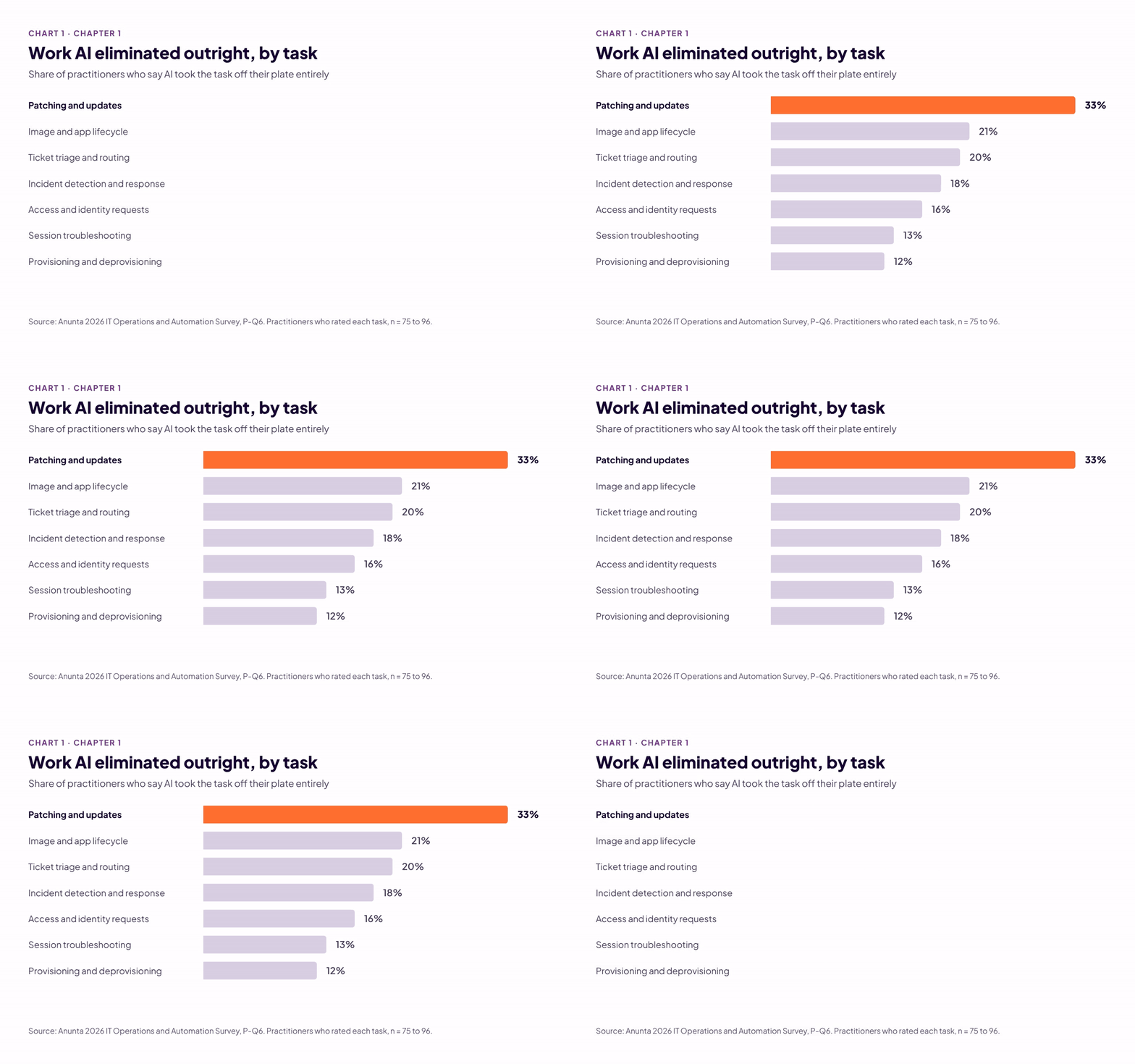
AI removes the most work in tasks where the same action applies to every machine, and patching leads the list.
Patching was one of the first desktop tasks IT automated, long before AI entered the conversation. Rule-based tools have pushed updates on a schedule for years. In the environments we support, exceptions take most of the team’s time: a machine misses its reboot window, an app breaks after an update, or a device never checks in. AI-assisted tooling promised to resolve those exceptions without a person.
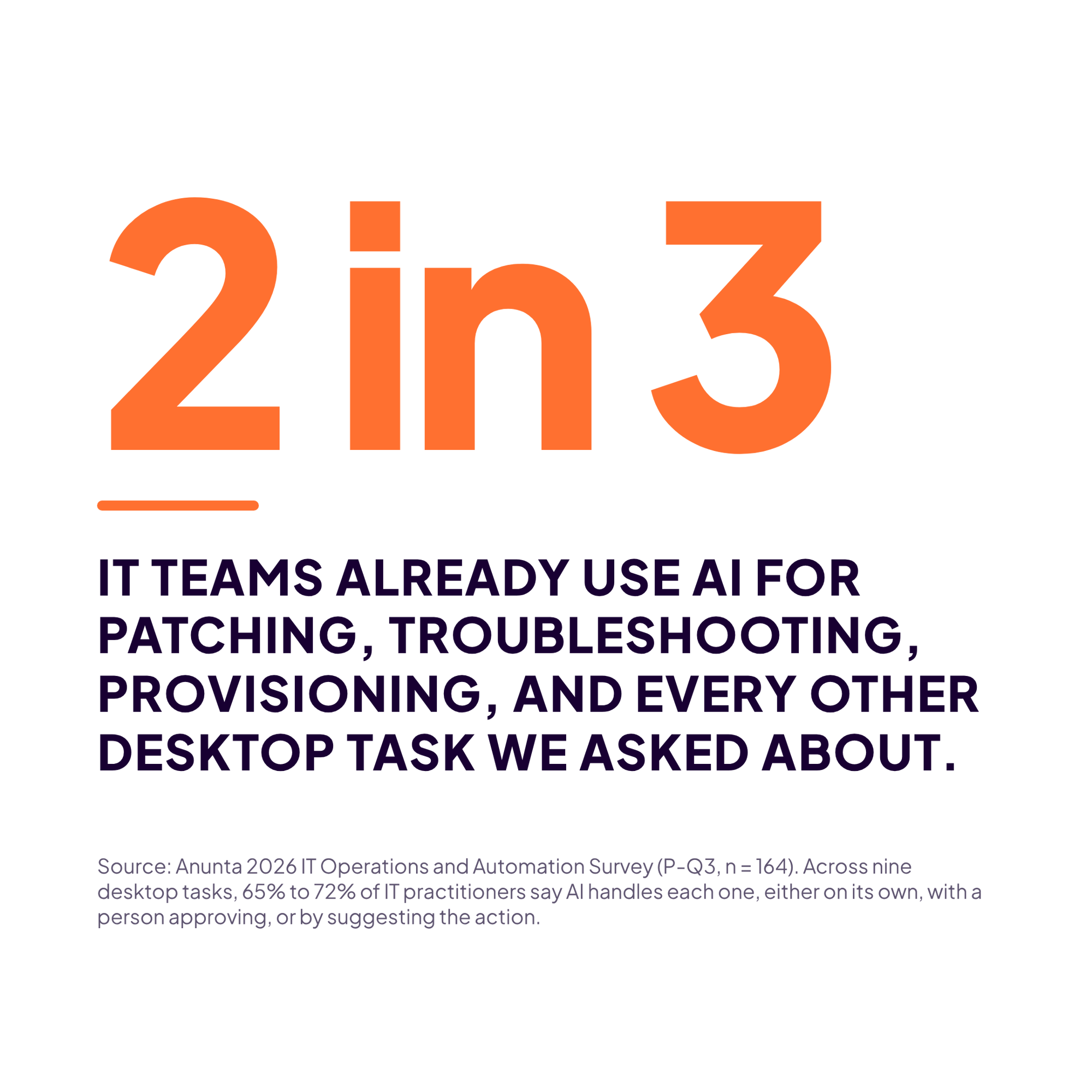
Patching is the desktop task where AI most often eliminated the work outright. The next task on the list, image and app lifecycle, trails well behind. Still, even this best result reaches only one team in three. Most of the other teams fall into one of two groups. Some still do all of their patching by hand, at 29%. Many more use AI but keep a person involved: 27% have a person approve what AI does, and 24% have a person carry out what AI suggests. For those teams, AI shrinks the patching work instead of eliminating it. In our experience, many keep that person in place on purpose, to test patches before they reach production.
Eliminating work is one way to measure whether AI pays off. A second way is how often teams let AI act without asking a person first.
Teams most often let AI run ticket triage with no human approval, at 17%. Patching follows at 15%, and isolating devices and access requests each sit at 10%. Triage and patching share a trait: one rule holds across the whole environment. Provisioning looks just as routine, and its results tell a different story.
The tasks AI handles well share one trait: the right action is the same no matter whose machine it is. Provisioning breaks that pattern. Half of practitioners say AI reduced their provisioning work, and the work still needs a person’s attention. Only 7% let AI provision without approval, the lowest share of any task. The request itself explains why. The right action depends on who the user is, what role they hold, and what they’re entitled to use. Those details change with every request, and a person who knows the user has to finish the work.
AI removes the most work where one action fits every machine.
Standardize first, and AI can take more.
Pull 90 days of patch exceptions. If they cluster on a few builds, fix those builds before adding tools. If they’re scattered across the fleet, keep a person on verification.
When the right fix depends on who the user is or what they’re doing, AI rarely finishes the job on its own. The work moves to another team or turns into time spent checking and tuning the AI. That pattern helps explain why more teams say their workload went up than went down.
Leaders bought AI-assisted tooling to make their teams better rather than smaller. Their top expected outcomes were faster issue resolution (63%), fewer incidents (59%), and lower operating costs (53%). Only 28% expected to reduce headcount. Each of those goals depends on AI taking work off the team’s plate. The catch is that time AI saves on one task can show up again as work somewhere else.
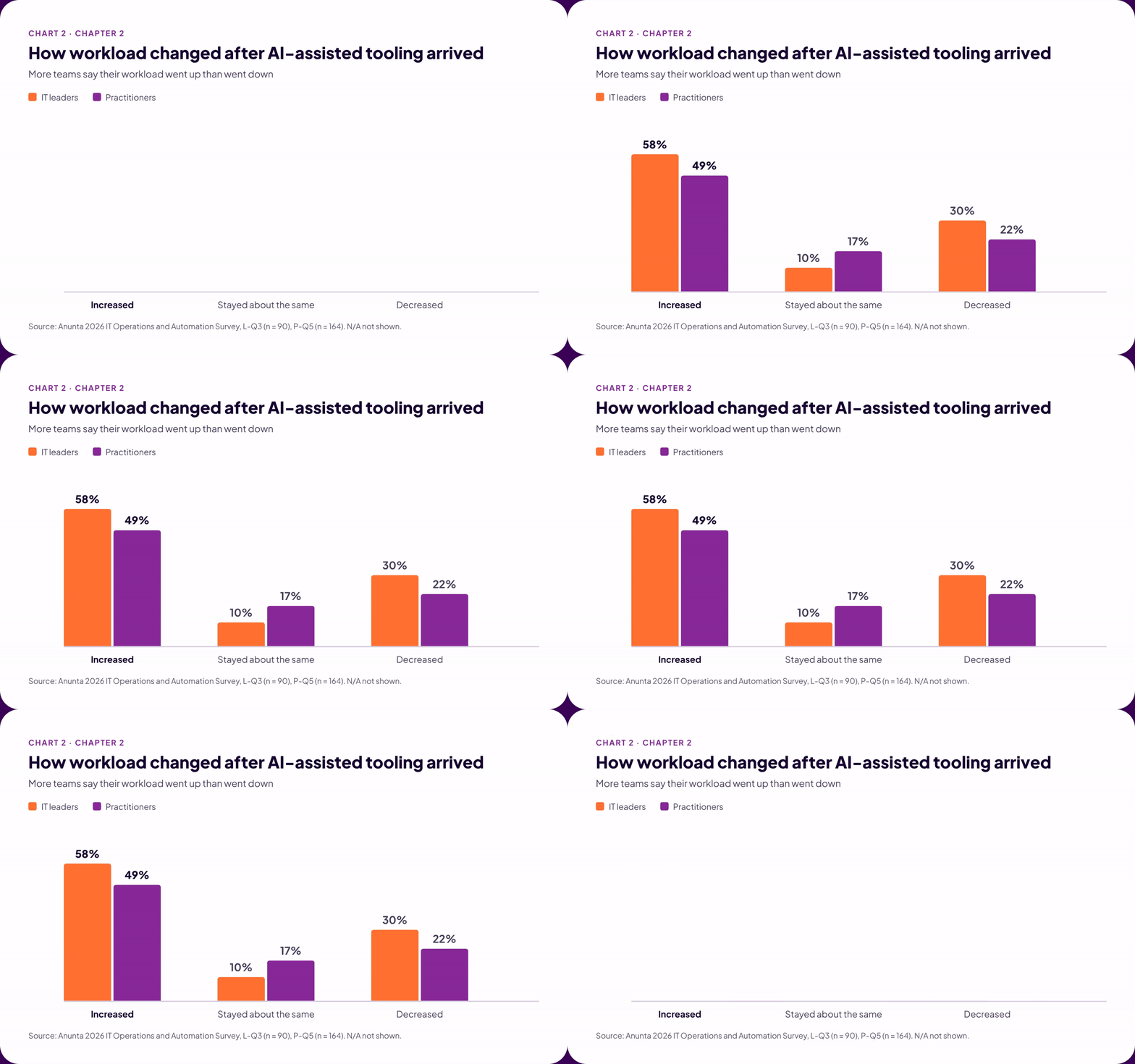
Most leaders say their team’s workload went up rather than down, and practitioners report the same direction. The daily queue tells a similar story. For 55% of practitioners, desktop issues reach the team at least once a day. For those teams, the work AI was supposed to reduce still shows up every day.
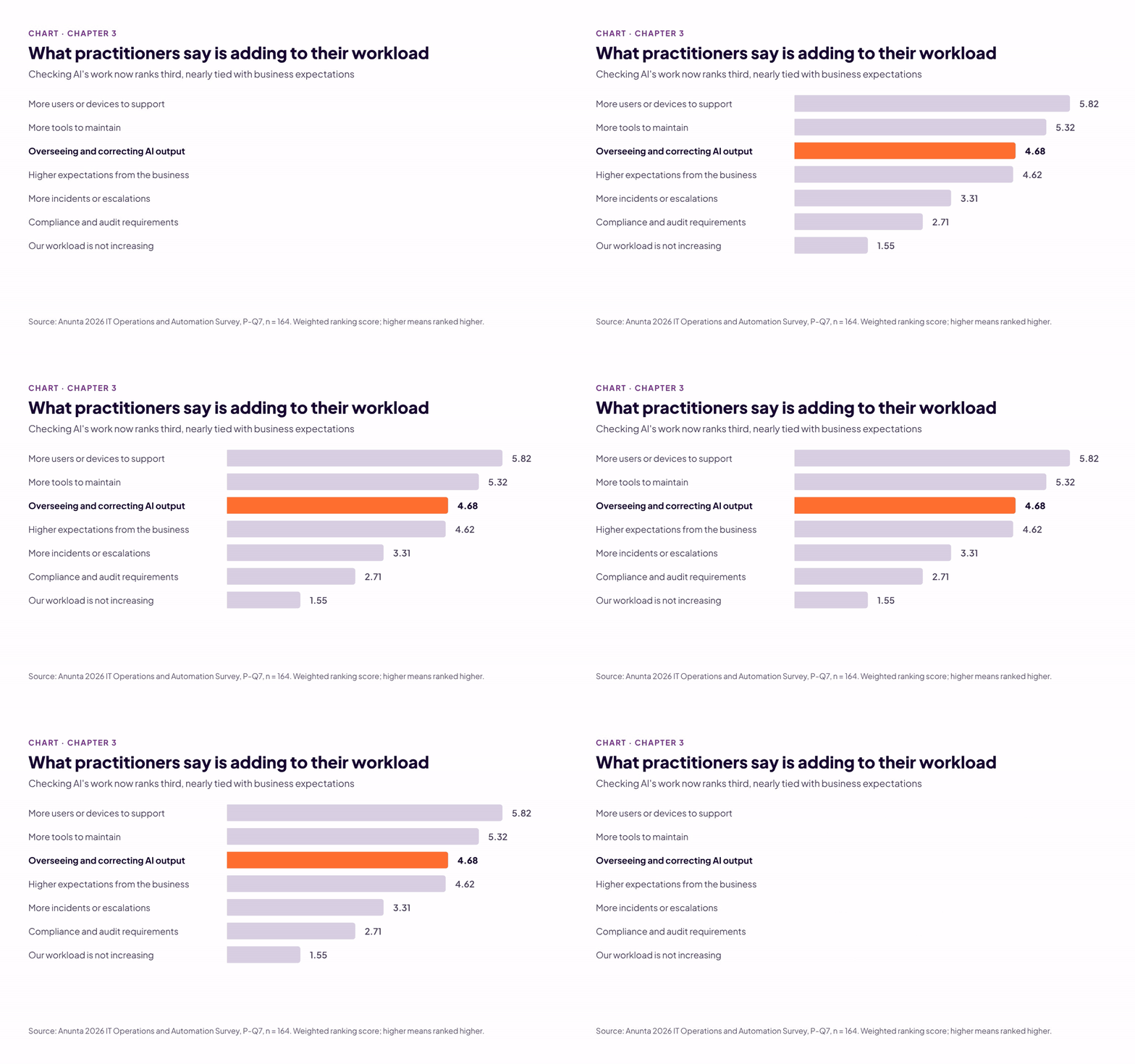
Other forces add to the load, too. Practitioners rank more users and devices as the top driver of their workload, and 72% rank “our workload is not increasing” dead last. Workforce reductions add pressure as well, because the same work spreads across fewer people.
Sometimes the work AI takes on ends up with another team instead of going away. Ticket triage is the clearest example. When we asked practitioners what happened to their triage work after AI took it on, the most common answer was that it moved to another team, at 30%. Incident response and access requests followed the same pattern, with 24% and 20% saying the work moved. That work still takes someone’s time. It lands on a different team’s plate instead, and one team’s relief can become another team’s workload.
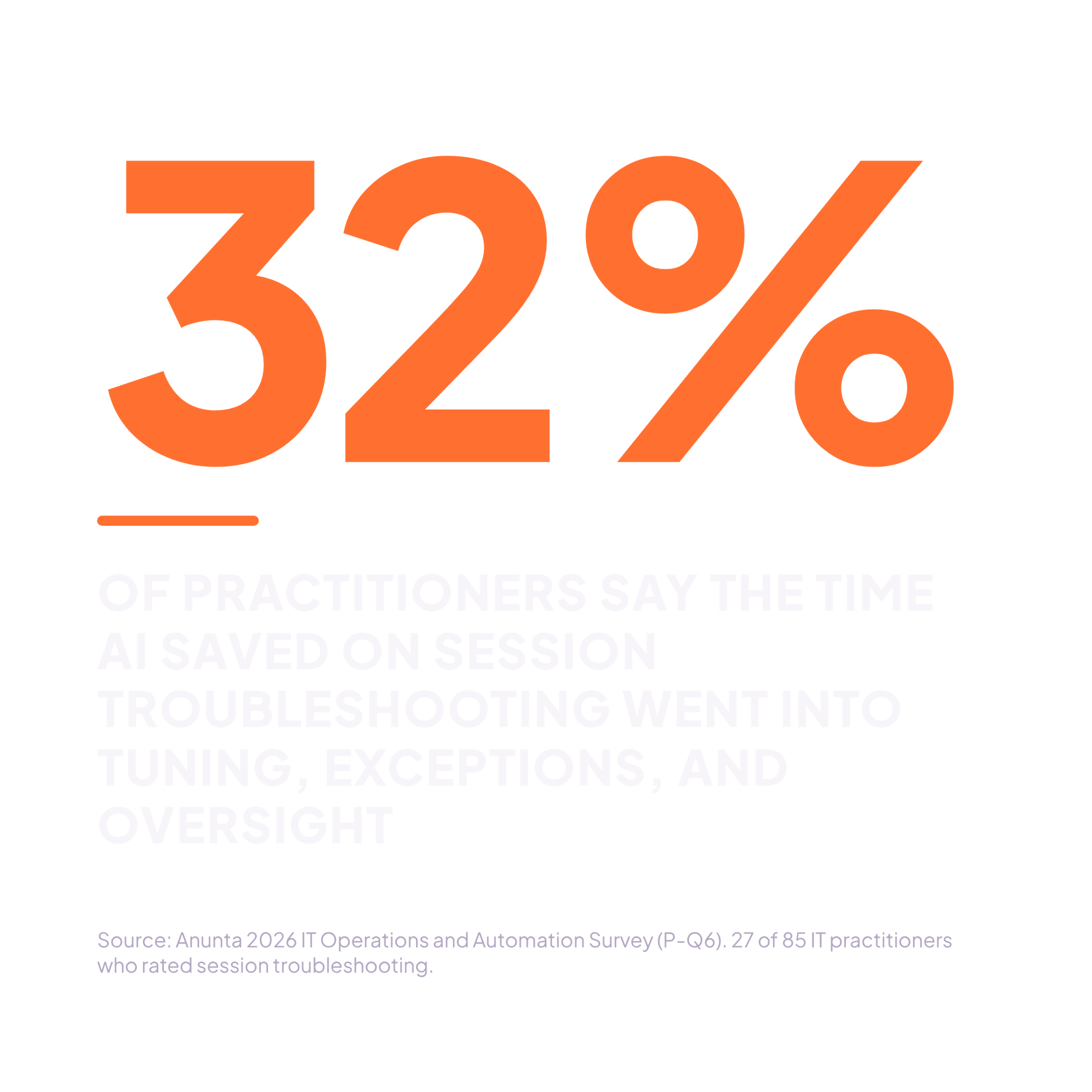
Teams let AI diagnose a live session far more often than they let it act. Session troubleshooting also turns saved time into new work more often than any other task. Among practitioners who rated it, 32% say the time AI saved went into tuning, exceptions, and oversight.
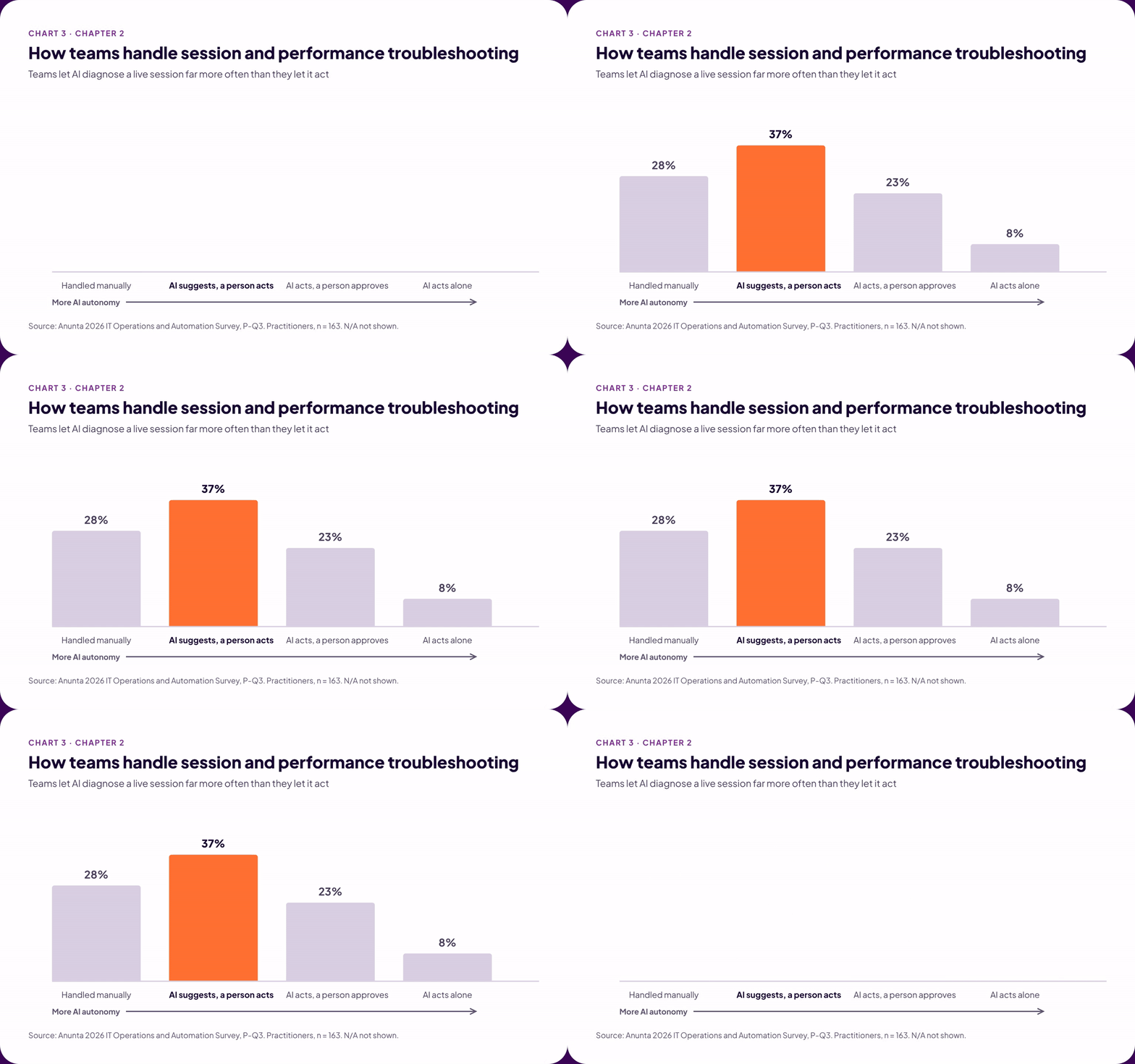
Where the right action depends on the person, AI moves work or creates more of it.
Measure payoff by where the work went.
List every piece of context a person checks before closing an app or restarting a session. That list is the bar AI must clear before it acts alone.
Pulling a task back from AI can feel like admitting the investment failed. A better reading is that the team is testing where AI belongs and adjusting where appropriate. The hard part is knowing when the evidence is clear enough to make final decisions.
AI-assisted tooling makes that evidence harder to read than a script does. When a script fails, it stops and logs an error. AI can return an answer that sounds right but is empirically wrong. It can also incorrectly report success on tasks and scripts that never completed. Either way, the failure can go unnoticed for weeks.
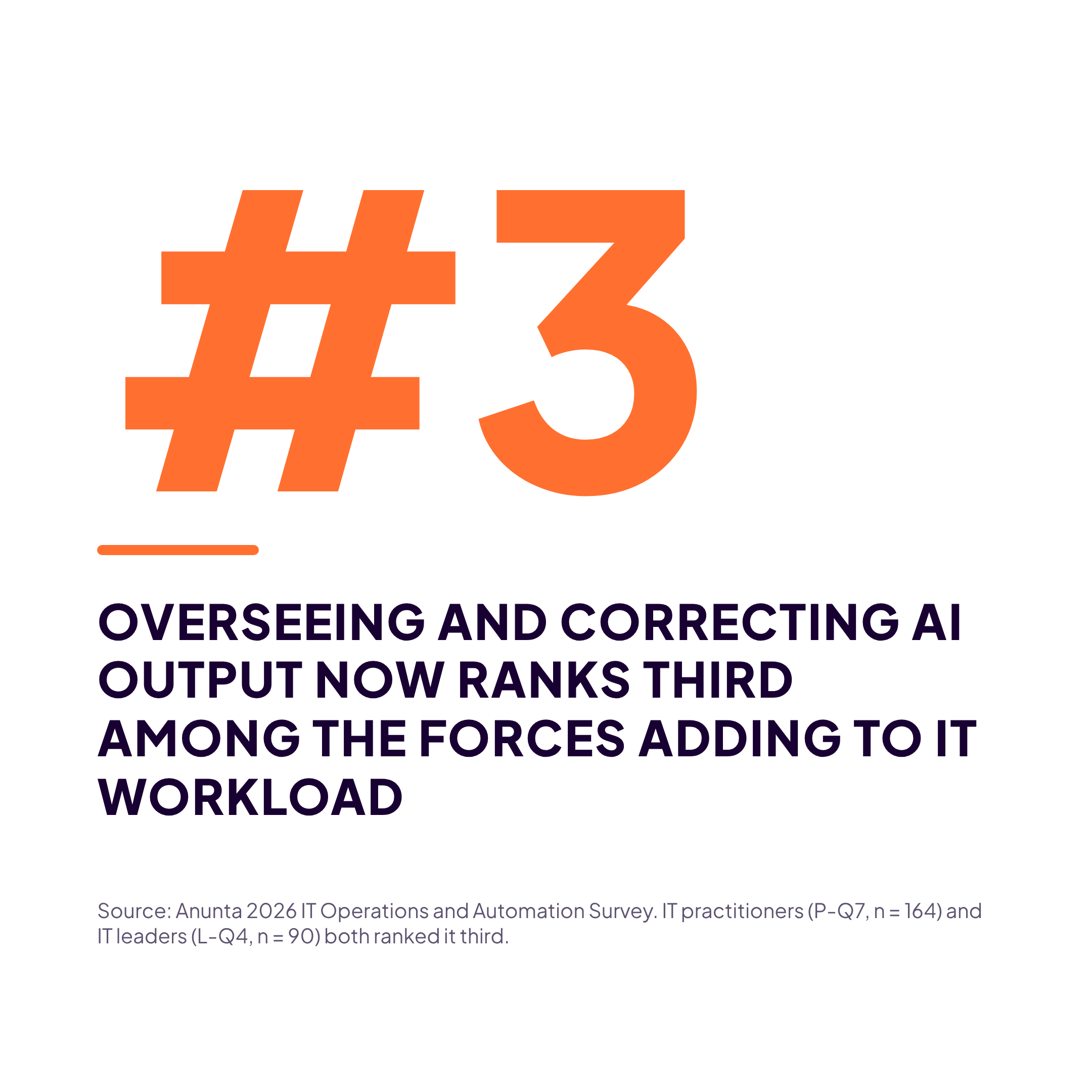
Checking AI’s work is now one of the biggest new demands on IT time. Practitioners rank overseeing and correcting AI output third among workload drivers, nearly tied with higher expectations from the business. Leaders rank it third as well. Triage, the task teams most often let AI run alone, still sends time back to people. Among practitioners, 15% say time AI freed on triage went into tuning, exceptions, and oversight. Verification is a fair price while a team builds trust. If checking the AI’s work takes as long months later as it did in the first week, the task belongs back with people.
Each of these signs means the AI lacks the context it needs, or the team can no longer see when the AI is wrong.
Most teams have taken work back, and checking AI’s work now ranks among the top workload drivers.
Decide what brings a task back before it goes live.
Name the warning signs and an owner for every AI-assisted task. Spot-check a sample of AI-completed work every month, even when nothing looks wrong.
The best next investment expands the work AI already handles well: standardize what you run today and decide who will run AI agents’ desktops tomorrow.
AI agents that need their own desktop, virtual machine, or hosted session are already here. Among IT leaders, 89% say their organization runs or pilots them, and half have agents in production. Nearly three in four practitioners say the same. Someone has to run the desktops those agents need.
Every desktop tool and service level assumes a person on the other end of the session. An agent has no user to call and no complaint when its session slows. The missing user can work in IT’s favor. With no person at the machine, the right action stays the same from one session to the next. An agent desktop can be the most uniform workload a team runs. The payoff depends on clear ownership and tooling that can support it.
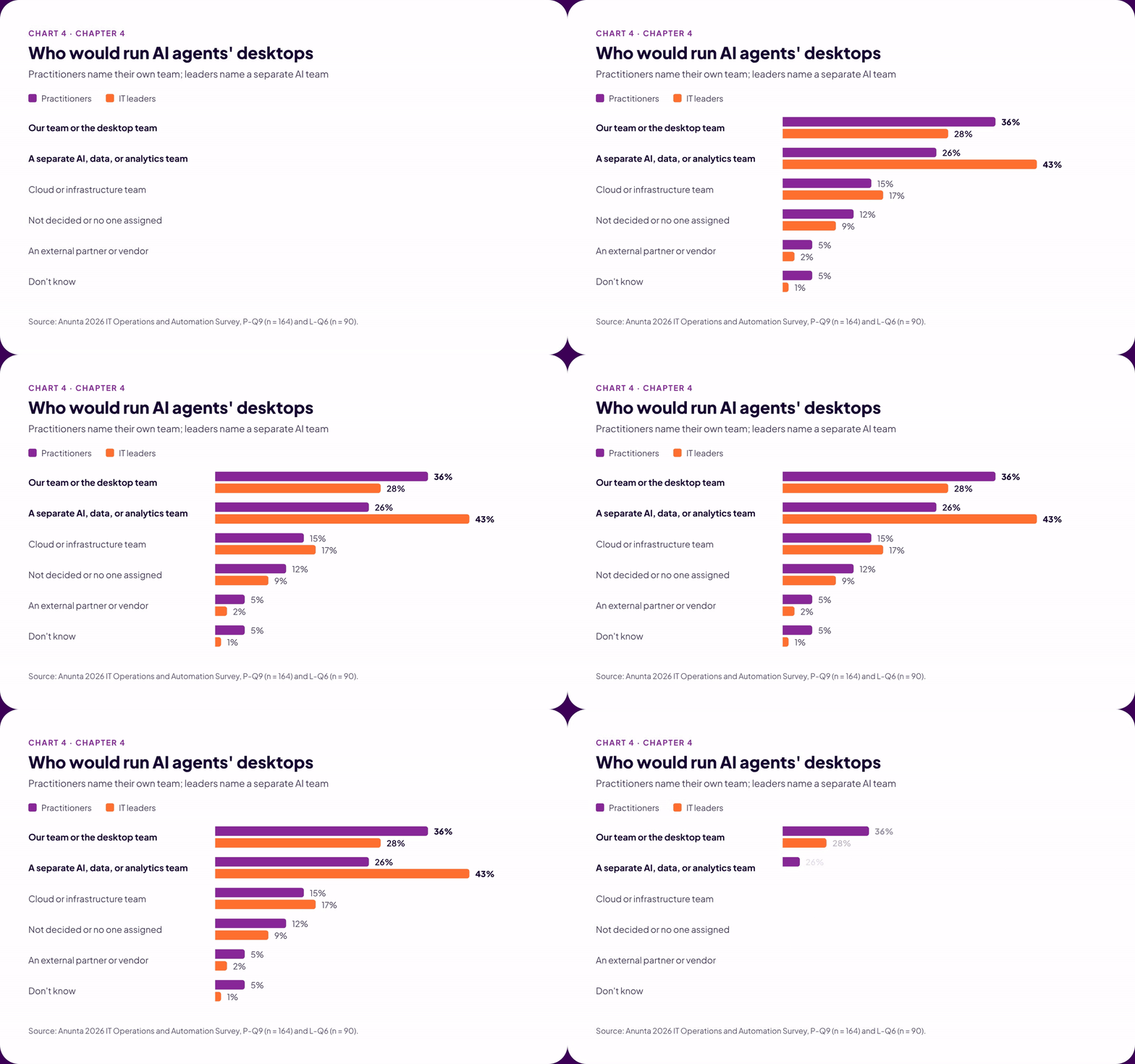
Practitioners most often say their own team would run agent desktops, while leaders most often name a separate AI team. Neither group has a majority, and about one in ten in each group has no decision or owner yet. Organizations have faced this choice before.
When DevOps took hold, many organizations created a separate DevOps team. In There’s No Such Thing as a “DevOps Team”, Jez Humble argued in 2012 that the separate team became one more silo, and that the practice belonged inside the teams that build and run the systems.
A separate AI team for agent desktops risks the same result. That team would need its own way to image, patch, and monitor desktops, which the desktop team already does every day. The organization would end up running two desktop operations side by side, each with its own tools. Problems can fall through the handoff between them. Keeping agent desktops with the desktop team lets them inherit the standard builds that make AI pay off in the first place.
23% of practitioners say their team could support a workload with no human user on the tooling it has today.
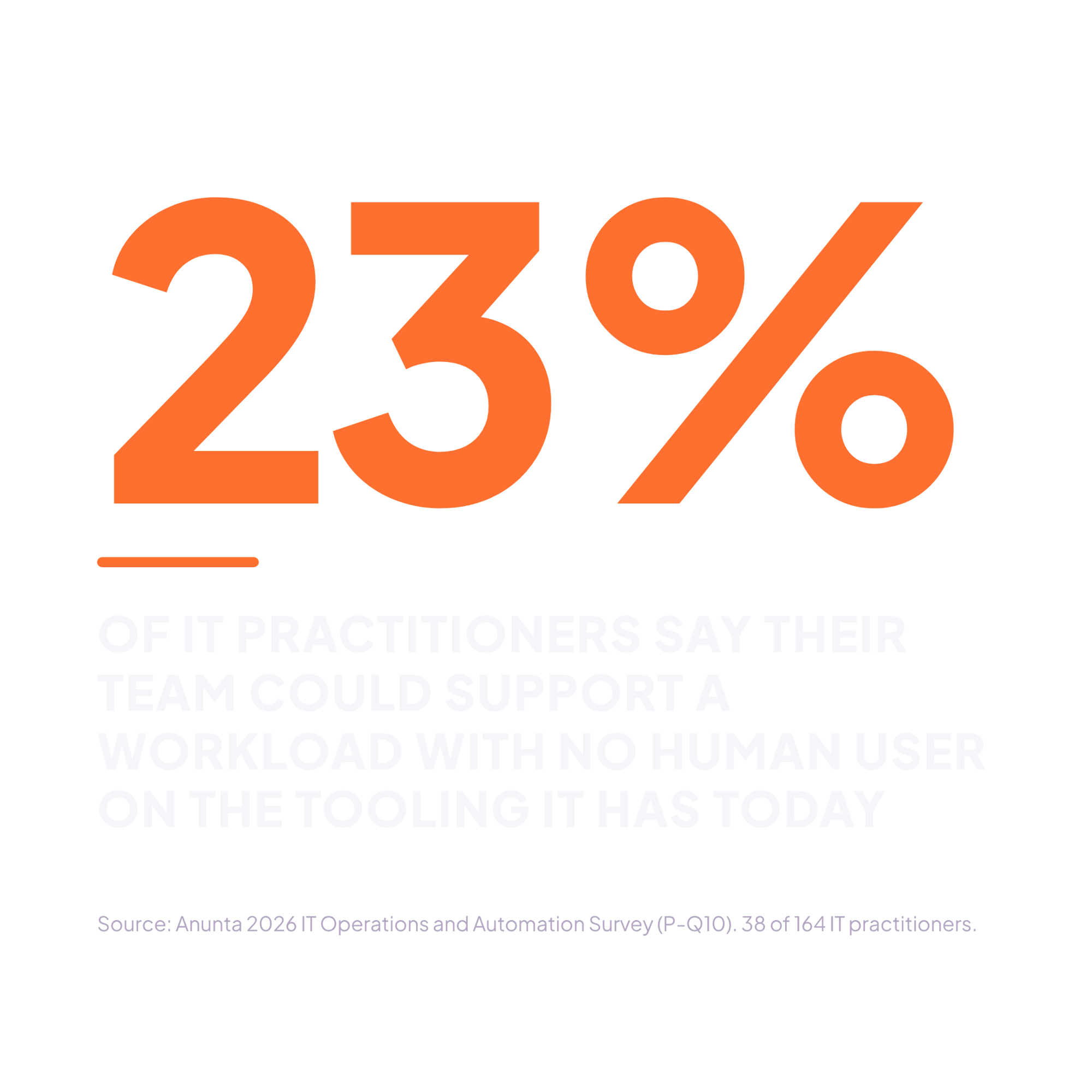
Another 52% would need some changes, and 14% would need new tooling (P-Q10). In our experience, the gap shows up in tools built around people, such as monitoring that waits for user complaints and service levels tied to tickets. Leaders’ funding plans lean on new tooling, and the data points to a different first priority.
Leaders rank more tools to maintain as their team’s top workload driver, and practitioners rank it second. Yet better tooling tops leaders’ funding plans. Views on AI itself are split: AI and automation rank fifth overall, while 21% of leaders rank them first. Outside expertise ranks last, with 64% of leaders putting it at the bottom.
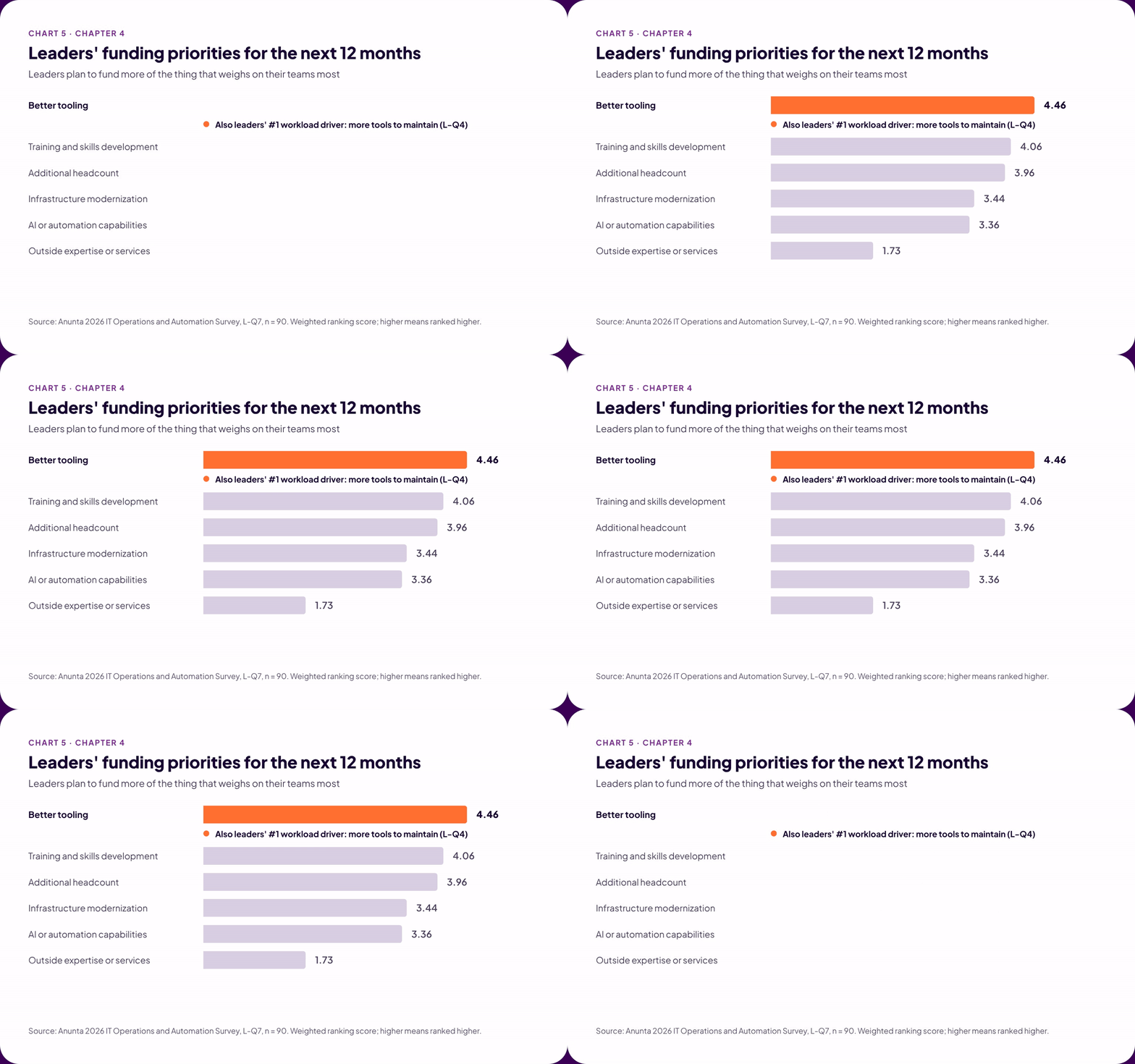
Every new tool is one more system to patch, monitor, and verify. Chapter 1 points to a better first investment. Standardizing pays off sooner than adding tools, because AI removes the most work where one action fits every machine. Training fits the same logic, because skills built inside the desktop team serve people’s desktops and agents’ desktops alike.
Agent desktops are arriving faster than teams can support them.
Standardize first, give agent desktops to the desktop team, and fund that team’s skills.
Stand up one virtual desktop with no user assigned, using only today’s tools. Every workaround marks your next investment.
So, where does AI pay off in desktop operations? AI pays off on repeatable work, like patching, where one fix works on every machine. AI struggles with work that depends on the user, like troubleshooting a live session. Four questions can help your team tell the difference, one task at a time.
Nearly a third of IT leaders invested in AI hoping to free their teams for project work. That goal is within reach. Standard builds give AI more work it can finish on its own. Clear warning signs tell teams when to take work back. Named owners make sure someone checks the results. Teams that build those habits will let AI carry the repeatable work and give their people more time than they have today for the problems only people can solve. That time, given back to the team, is the payoff.
See how your team’s use of AI compares with your peers’, and find out what you can do to ready yourself for AI, task by task.
Brainstorm your next steps in AI with our team. They've seen it all. Maybe they can help?